Joe's Filters: Joe's Field Blender
A de-interlace and film look plugin for Final Cut pro which blends two video fields to help motion look more like film.Visit the New FXScript Reference and Joe's Filters sites. These pages will be phased out soon and may already be out of date.
The Joe's Field Blender plugin is a part of Joe's Filters, shareware utility and image processing effects for Final Cut Pro.
What it does
Joe's Field Blender is a deinterlace filter which uses an alternate method of de-interlacing video. Both fields are used to create a new frame which can give the appearance of a slight motion blur in the frame. This effect is acheived by scaling both fields to full height and then blending them, resulting in a more natural and organic version of the interlaced image.
The controls for Joe's Field Blender are deliberately simple. The single slider moves from the lower field on the left to the upper field on the right. In DV the lower field comes first, so the slider acts a selector of time, moving between two instants with a fraction of a second between them. On a fast computer, moving the slider back and forth will make moving objects in a frame appear to shift forward and backward in time.
This filter provides results similar to Joel Peregrine's adaptation of Shawn Bockoven's Film Look technique. Because this effect uses a significantly faster de-interlace routine than Final Cut Pro's De-Interlace filter, the same effect can be created in less than half the time. (In preliminary testing, Joe's Field Blender was consistently 230% faster than the twin de-interlacing technique.)
Example Images
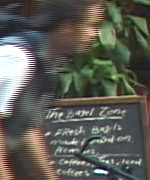 Original Interlaced Image |
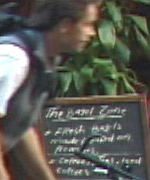 Blend: 0 (Lower Field) |
 Blend:100 (Lower Field) |
 Blend: 30 |
 Blend: 50 |
 Blend: 70 |
The two interlaced fields of video are either 1/60 (NTSC) or 1/50 (PAL) of a second apart in time. Setting the blend value towards the second field (above 50) creates a motion trail following the direction of motion, blending towards the preceding frame (below 50) results in a motion trail before the image, backwards from how we tend to see and understand motion.
Controls

- Blend (0 - 100)
Determines balance of the two fields in the resulting image. Setting Blend to 0 (right side) it results in 100% of the lower/first field, 100 (left) results in 100% of the upper/second field. Moving the slider adds opacity of one field while subtracting the opacity of the other. A setting of 70 means 70% upper field and 30% lower field. 50 is an even mix of both fields.
- Method
Sets the de-interlacing method for the pre-blended fields.
DV vs. non-DV Field Order
DV's field order is the opposite of most other video standards. The orientation of the Field Blender slider definitions is basically arbitrary so if you are working with non-DV source just reverse the slider's behavior for the same results.
Note about De-Interlace Previews
De-interlace effects need to be rendered for an accurate preview. At zoom values below 100%, Final Cut Pro's desktop previews only show the lower field of interlaced video, pre-rendered effects use this scaled down, single-field image to preview before rendering.
Joe's Filters for Final Cut Pro
Joe's Filters
Joe's Filters Related
FXScript for Final Cut Pro
Joe's Debug and Explore Filters
Final Cut Pro tips
Film & Video
Recording the sound of
one eye blinking
Photography
Projects
Final Cut Pro
Design
WRITING
Site Notes Archive (weblog)
Web Resources
About Joe Maller
Past Home Pages Etc.
Search joemaller.com
Contact Me