Joe's Filters: Joe's Levels - Sampled Color
A semi-automatic full-color Levels adjustment based on sampled image colors.Visit the New FXScript Reference and Joe's Filters sites. These pages will be phased out soon and may already be out of date.
The Joe's Levels - Sampled Color plugin is a part of Joe's Filters, shareware utility and image processing effects for Final Cut Pro.
What it does
Joe's Levels - Sampled Color performs a semi-automatic levels adjustments based upon up to three sampled colors. The plugin's controls are similar to Photoshop's Levels eyedroppers but add additional ways of using the color samples. Final Cut Pro's built in color controls help the simple interface offer a huge range of quick color correction options.
This adjustment can be used to calculate automatic White Point correction, auto-Gamma adjustments and Black point adjustments. Each of the three color samples can be used as a color or value adjustment. When Value Averaging is unchecked, adjustments work against sampled colors, attempting to move them towards gray. When Value Averaging is on, hue is maintained and the sample is used to adjust the overall value of the image. To fine-tune a sampled color, turn down the color detail arrow and adjust the color.
Example Images
|
|
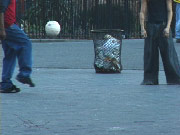 Original Image |
|
White Point :
|
White Point : |
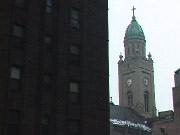 Original Image |
|
|
White Point : |
White Point :
|
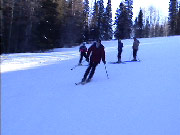
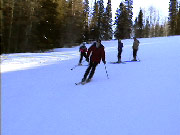







Controls

- White Point
Sampled color used as the brightest color in the levels adjustment. Red, Green and Blue values are calculated independently. No white point correction take place when the sampled color's brightness is set to 100.
- Value Average
Tells the effect to calculate the white-point adjustment based upon the overall value of the sampled color. Value averaging calculates the mathematical average of the RGB color values and uses that value as the basis for the levels corrections.
- Gray Point
Selects the color used to calculate the Gamma adjustment. Each primary color's Gamma curve is reversed shifting the selected color in neutral gray. No gray point correction takes place when the sampled color's saturation is set to 0.
- Color & Value
Selects the method for determining Gamma adjustments. When Color & Value is unchecked, Gamma adjustments are based on each primary color's distance from their average color. When checked, adjustments are based on each primary color's distance from absolute gray.
- Black Point
Switches on the blur for the checked channels, the same radius blur will be applied to the channels selected. No black point correction takes place when the sampled color's brightness is set to 0.
- Value Average
Turns on Value Averaging for the Black Point sample.
Because each sampled color is based on the result of previous adjustments, it may be helpful to temporarily disable the filter's effect while selecting colors.
Joe's Filters for Final Cut Pro
Joe's Filters
Joe's Filters Related
FXScript for Final Cut Pro
Joe's Debug and Explore Filters
Final Cut Pro tips
Film & Video
Recording the sound of
one eye blinking
Photography
Projects
Final Cut Pro
Design
WRITING
Site Notes Archive (weblog)
Web Resources
About Joe Maller
Past Home Pages Etc.
Search joemaller.com
Contact Me